Limaçons

When I first started getting interested in roulettes I began in polar form graphing limaçons. Without going into as much detail as with the roulettes, I offer just one today.

I found this Winplot illustration instructive as to how polar graphs are formed and just how the graphs work and relate to rectangular form graphs of the same functions. So this could be used as a first example, or an investigation of its own.

For my example we will consider the limaçon, or a cardioid with an inner loop, given below (using t for the usual theta, since the LaTex translator doesn’t seem to be able to handle thetas).

r\left( t \right)=1.4-2\sin \left( t \right)

In polar form {{r}_{1}}\left( t \right)=1.4 is a circle with center at the pole and radius of 1.4.This is shown in light blue in the figures.

The polar curve {{r}_{2}}\left( t \right)=2\sin \left( t \right) is a circle with center at \left( 1,\tfrac{\pi }{2} \right) and radius of 1. This is shown in orange in the figures below.

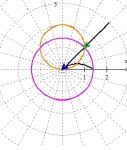
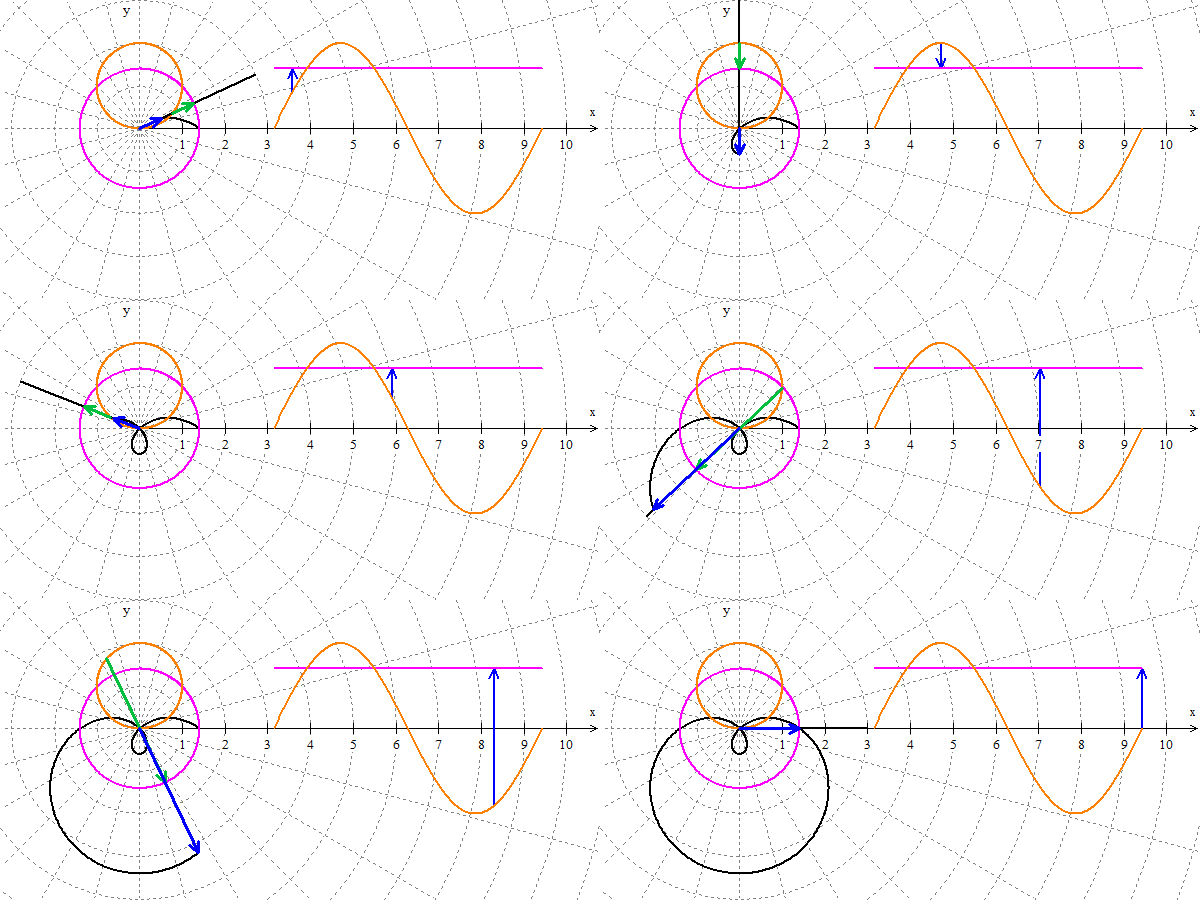
The graph in the example isr\left( t \right)={{r}_{2}}\left( t \right)-{{r}_{1}}\left( t \right)  the directed distance (length of the vector) from {{r}_{1}}\left( t \right) to {{r}_{2}}\left( t \right) and is shown by the green arrow in figures 1, 3, and 4.

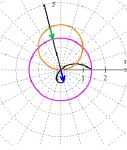
The blue arrow is congruent to the green with its tail at the pole; its point traces the limaçon shown in black. (Click to enlarge.)

  •  In figure 1, the distance is positive and both arrows point in the same direction along the rotating ray.
  • In figure 2, the two circles intersect and the distance between them is zero. The limaçon goes through the origin.
  • In figure 3, the curves have changed position and the directed distance is negative. The blue arrow points in the negative direction opposite to the rotating ray drawing the inner loop.
  • In figure 4, the arrows return to pointing in the same direction, but are longer due to the fact that the distance runs from the orange circle to the far side of  the light blue circle forming the bottom outside loop

In the clip below the limaçon is drawn as the black ray rotates from 0 to 2\pi  radians. Watch how the green and blue arrows (always the same length, but not the same direction), work to draw the limaçon.

On the right side of the clip are the two functions graphed in rectangular form. The blue arrow on the right is the same length as the blue arrow on the left and gives the directed distance from {{r}_{1}}\left( t \right)  to {{r}_{2}}\left( t \right). This form is probably more familiar to students and may help them see the relationships.
A limaçon being graphed.

A limaçon being graphed.

This form is probably more familiar to students and may help them see the relationships. The Winplot file may be downloaded here. If you or your students what to investigate further, click on the Winplot graph and then CTRL+SHIFT+N to see the notes; they will also tell you how to change the A, B, and R sliders to change the curves.

Roulettes and Art – 2

Continuing with our discussion of ways to produce interesting designs with the Roulette Generator (RG) for Winplot, here are some hints on making more detailed designs using more than one function.

Hint #5: Adding more graphs to the first: You may add other graphs by selecting the roulette and/or velocity equations from the Inventory (CTRL+I) and clicking “dupl”  to duplicate the equation. Then click the duplicate and then “edit” and change the sign in front of the S in both equations. This will let you graph S and –S at the same time. This will give you two congruent graphs with the first rotated 2\pi /n from the first. (From the previous posts: if \left| R \right|=\tfrac{n}{d} then there are d dips, loops, or cusps in n full revolutions). Both graphs will have the same R value.  

You may also change the color of all the graphs.

Here is a graph with that idea. The values are in the caption.

R = -0.322, S = -0.3 (blue) and S = +0.3 (green) and their derivatives (orange and   xxx  15 Revolutions

R = -0.322, S = -0.3 (blue) and S = +0.3 (green) and their derivatives (orange and gray),
15 Revolutions

Hint #6: Plotting Density (PD) (Winplot RG only) also affects the final drawing. Graphers work by calculating a number of points and joining them with straight segments. The default plotting density is 1. Usually this results in a nice graph with smooth looking curves because the segments are very short. If your graph looks like a bunch of segments, select the equation in the Inventory, click “edit”, and increase the plotting density (to 10 or 100 or more) and the curves will no longer look like segments. Of course, you may want them to look like segments. The graph below shows how PD works. The graph on the left has a plotting density of 10. The center graph is a detail of the first with the same PD. The plot on the right is the same as the center graph but with a plotting density of 100.

Hint #7: In addition to PD, Winplot is very sensitive to image size and zooming in and out. Once you have a graph you like, experiment with zooming in and our (page-up and page-down keys) or dragging the corners of the frame. You will see a lot of different graphs.

Your turn: Try making this graph below with S=\pm \tfrac{1}{3}, R = 0.00667 and slightly less than a full revolution. Make the image size (under the file tab) 12.3 x 12.3 (the units are cm.), or 465 x 465 pixels (type @ after the number to use pixels). Amazing!
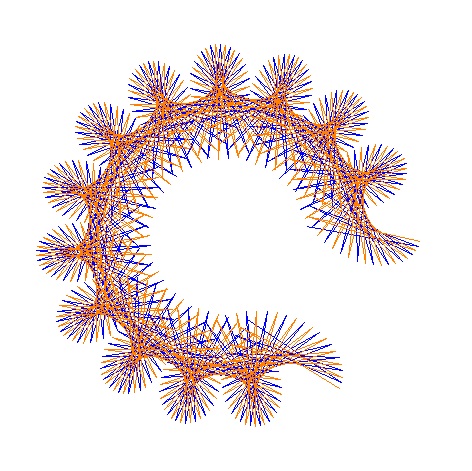

R6-3a


Every slight change makes a whole new design. Start with your own values. I would like to see what you and your students come up with. When you get the perfect one, e-mail it to me as a .jpg file and I will post it. (Please include the SR, and other data.

Roulettes and Art – 1

For the last few post, we have been exploring roulettes using the roulette generator (RG) for either Winplot or Geometer’s Sketchpad. These files use the equations

 x\left( t \right)=(1+R)\cos \left( t \right)-S\cos \left( \tfrac{1}{R}t+t \right)

 y\left( t \right)=\left( 1+R \right)\sin \left( t \right)-S\sin \left( \tfrac{1}{R}t+t \right)

 The derivative is given by the equations

{x}'\left( t \right)=-\left( 1+R \right)\sin \left( t \right)+S\left( \tfrac{1}{R}+1 \right)\sin \left( \tfrac{1}{R}t+t \right)

{y}'\left( t \right)=\left( 1+R \right)\cos \left( t \right)-S\left( \tfrac{1}{R}+1 \right)\cos \left( \tfrac{1}{R}t+t \right)

Notice that the derivative is also a form of roulette.

To generate various roulettes by changing the values of R and S as explained in the first post in this series.

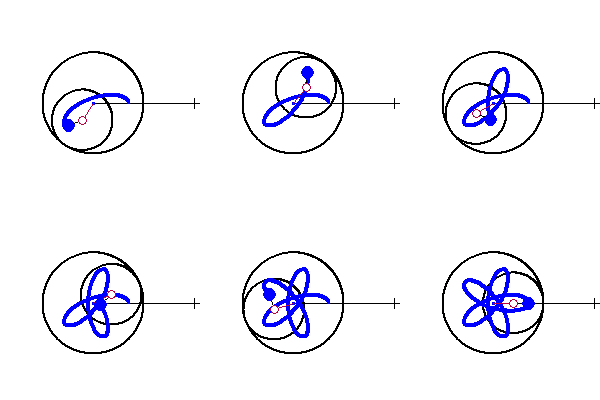
When my friend Audrey Weeks finished making the Sketchpad RG for me she sent these three designs that she made using the generator. Suddenly, we were into art!

The designs may make a nice project for students studying parametric curves and help them learn a little more about the curves and their graphs. Here are some hints about how to use the Winplot RG to make these designs. (Most of the hints will also do for the Sketchpad RG except for changing colors, and generating several curves at once.)

 Hint 1: Begin by opening the RG file and saving it with a different name so you can makes the changes and still have the original available. In the new file,

  • Open the Inventory (CRTL+I) and delete everything except the one marked “Roulette” and the one marked “Velocity Graph” by selecting each and clicking the “delete” button.  This will remove the circles and other lines from the final drawings.
  • Then make a duplicate of the two remaining files by selecting them and clicking “dupl.” For the duplicates, click “edit” and change the sign preceding the S. This will let you draw graphs for S and –S at the same time. More on this below.
  • Click CTRL+G and turn the axes off.

 Hint 2: Number of revolutions: We learned in the first post in this series that from the number R expressed as a reduced fraction \left| R \right|=\tfrac{n}{d}, that d is the number of dips, loops, or cusps in the graph and n full revolutions will draw the entire graph (i. e. after n revolutions the same graph will be redrawn).

When using a large value of d the parts of the graph overlap each other and add to the design. So, use a large d to get a “fancier” graph.

If you use n revolutions your graph will have a number of rotational symmetries offset by 2\pi /n radians.

But you also get nice designs by using less than n revolutions. This draws part of the graph and can also make a pleasing design. See the captions to the figures in this post to get an idea of how this works.

Hint #3: Color: You can change the color by selecting the equation in the Inventory list and clicking “edit” and then “color.”  The background color can be changed by clicking “Misc” in the top bar and then “Background.”

Hint #4: Dips, loops and cusps: These are controlled by the S slider. If \left| S \right|=\left| R \right| there will be cusps, if \left| S \right|<\left| R \right| dips, and if \left| S \right|>\left| R \right| loops. (Of course, you could have your students discover this on their own.) Experiment with this to make other designs.
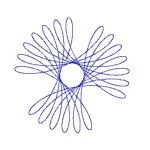
So, let’s try one.  First graph: I chose R = –0.321 and S = 0.440. Since 321/1000 does not reduce, there will be 1000 loops in 321 revolutions. But I graphed only about 6.5 revolutions (A = 40.212). Second Graph: includes the derivative of the first made by using the velocity equation in the Inventory.

These were just a few hints to get you started. In the next post we’ll look at some much more fancy designs. Meanwhile try some of your own and post them as comments. (Please include the R, S, and revolution values you used.).

Preview of the next post Roulettes and Art – 2:

R5-7

“Easier” Exams

There were two questions posted recently on the AP Calculus Community bulletin board. One teacher was concerned that his students took two different forms of the Calculus exam, and the means were not the same. He felt that one group has an easier time than the other. The other writer noted that on his (physics) exam three questions were not counted – there appeared to be only 32 questions instead of the 35 he expected.

My answer, which you may be interested in, was:

It is impossible to make two forms of the same test of equal difficulty. I repeat: It is impossible to make two forms of the same test of equal difficulty. (And if the two forms are equal in difficulty, it is due more to dumb luck than good management.)

What the ETS (Educational Testing Service) does to account for this fact is to adjust the cut points for the scores (5-4-3-2-1). A form of the exam that is “easier”, in the sense of having higher overall means, also has higher cut points. Regardless of the difficulty of the form of the exam the score (5-4-3-2-1) reflects the same amount of knowledge of the subject (as best as possible). Any other scheme would certainly not be fair. So, there is no need to be concerned that someone else had an easier exam than your students. They may well have, but their and your students’ score (5-4-3-2-1) reflects the same knowledge. Your students, and those with the easier exam, will get the score they earned.

Then I suggested that he consider his students one at a time without regard to the form of the test they took. Check and see if the students got the score you expected them to get. Keeping in mind that students often surprise or disappoint us, did the students get the scores he anticipated. If, in general, they got the scores he expected without regard to the form, then the ETS did its job.

As to the second concern: The ETS looks at the results individually for each and every question on the exam. If everyone scores very low on a particular question, or if some identifiable sub-group (men, women, one or more minorities) has scores that are way out of line with everyone else, the question is rejected and not scored. The other scores are re-weighted accordingly and the final score (5-4-3-2-1) reflects the same knowledge of the subject. This happens in math and science, but I suspect it happens more often in history, English, and the social sciences.

You might also refer to my recent post of May 12, 2014 Percentages Don’t Make the Grade on this topic.

Updated and revised July 12, 2014.


Roulettes and Calculus

Roulettes – 5: Calculus Considerations.

In the first post of this series Roulette Generators (RG) are explained. Here are the files for Winplot or Geometer’s Sketchpad. Use them to quickly see the graphs of these curves by adjusting one or two parameters.

While writing this series of posts I was intrigued by the cusps that appear in some of the curves. In Cartesian coordinates you think of a cusp as a place where the curves is continuous, but the derivative is undefined, and the tangent line is vertical. Cusps on the curves we have been considering are different.

The equations of the curves formed by a point attached to a circle rolling around a fixed circle in the form we have been using are:

x\left( t \right)=(1+R)\cos \left( t \right)-S\cos \left( \tfrac{1}{R}t+t \right)

y\left( t \right)=\left( 1+R \right)\sin \left( t \right)-S\sin \left( \tfrac{1}{R}t+t \right)

For example, let’s consider the case with R=S=\tfrac{1}{3}


Epicycloid with R = S = 1/3

Epicycloid with R = S = 1/3

The equations become

x\left( t \right)=\frac{4}{3}\cos \left( t \right)-\frac{1}{3}\cos \left( 4t \right)

y\left( t \right)=\frac{4}{3}\sin \left( t \right)-\frac{1}{3}\sin \left( 4t \right)

The derivative is

\displaystyle \frac{dy}{dx}=\frac{dy/dt}{dx/dt}=\frac{\cos \left( t \right)-\cos (4t)}{-\sin \left( t \right)+\sin (4t)}

The cusps are evenly spaced one-third of the way around the circle and appear at t=0,\tfrac{2\pi }{3},\tfrac{4\pi }{3}. At the cusps dy/dx is an indeterminate form of the type 0/0. (Note that at t=\tfrac{2\pi }{3}\cos \left( 4t \right)=\cos \left( \tfrac{8\pi }{3} \right)=\cos \left( \tfrac{2\pi }{3} \right) and likewise for the sine.) Since derivatives are limits, we can apply L’Hôpital’s Rule and find that at t=\tfrac{2\pi }{3}

\displaystyle \frac{dy}{dx}=\underset{t\to \tfrac{2\pi }{3}}{\mathop{\lim }}\,\frac{-\sin \left( t \right)+4\sin \left( 4t \right)}{-\cos \left( t \right)+4\cos \left( 4t \right)}=\underset{t\to \tfrac{2\pi }{3}}{\mathop{\lim }}\,\frac{3\sin \left( t \right)}{3\cos \left( t \right)}=\tan \left( \tfrac{2\pi }{3} \right)=-\sqrt{3}

This is, I hope, exactly what we should expect. As the curve enters and leaves the cusp it is tangent to the line from the cusp to the origin. (The same thing happens at the other two cusps.)  At the cusps the moving circle has completed a full revolution and thus, the line from its center to the center of the fixed circle goes through the cusp and has a slope of tan(t).

The cusps will appear where the same t makes dy/dt = 0 and dx/dt =0 simultaneously.

The parametric derivative is defined at the cusp and is the slope of the line from the cusp to the origin. Now I may get an argument on that, but that’s the way it seems to me.

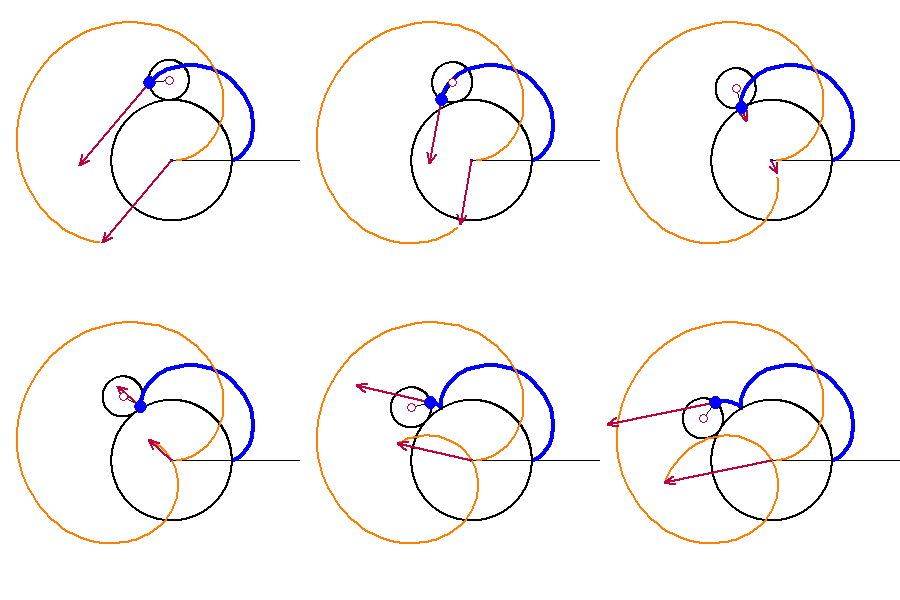
A look at the graph of the derivative in parametric form may help us to see what is going on. In the next figure R=S=\tfrac{1}{3} with the graph of the curve is in blue. The velocity vector is shown twice (arrows). The first is attached to the moving point and shows the direction and its length shows the speed of the movement. The second shows the velocity vector as a position vector (tail at the origin). The orange graph is the path of the velocity vector’s tip – the parametric graph of the velocity. Note that these vectors are the same (i.e. they have the same direction and magnitude)

The video shows the curve moving through the cusp at. Notice that as the graph passes through the cusp the velocity vector changes from pointing down to the right, to the zero vector, to pointing up to the left. The change is continuous and smooth.

Velocity near a cusp.

Velocity near a cusp.

Here is the whole curve being drawn with its velocity and the velocity vectors.

Epicycloid with velocity vectors

Epicycloid with velocity vectors

(If you are using the Winplot file you graph the velocity this way. Open the inventory with CTRL+I, scroll down to the bottom and select, one at a time, the last three lines marked “hidden”, and then click on “Graph.”). The Geometer’s Sketchpad version has a button to show the derivative’s graph and the velocity vectors.

The general equation of the derivative (velocity vector) is

\displaystyle {x}'\left( t \right)=-\left( 1+R \right)\sin \left( t \right)+S\left( \tfrac{1}{R}+1 \right)\sin \left( \tfrac{1}{R}t+t \right)

\displaystyle {y}'\left( t \right)=\left( 1+R \right)\cos \left( t \right)-S\left( \tfrac{1}{R}+1 \right)\cos \left( \tfrac{1}{R}t+t \right)

Notice that the derivative has to same form as a roulette.

Finally, I have to mention how much seeing the graphs in motion have helped me understand, not just the derivatives, but all of the curves in this series and the ones to come. To experiment, to ask “what if … ?” questions, and just to play is what technology should be used for in the classroom. See what your students can find using the RGs.

Exploration and Challenge:

Consider the epitrochoid x\left( t \right)=\frac{2}{3}\cos \left( t \right)+\frac{1}{3}\cos \left( 2t \right),y\left( t \right)=\frac{2}{3}\sin \left( t \right)-\frac{1}{3}\sin \left( 2t \right).

  1. Find its derivative as a parametric equation and graph it with a graphing program or calculator. (Straight forward)
  2. Are the graph of the derivative and the graph of the rose curve given in polar form by r\left( t \right)=\frac{4}{3}\sin \left( 3t \right) the same? Justify your answer.  (Warning: The graphs certainly look the same. I have not been able to do show they are  the same (which certainly doesn’t prove anything), so they may not be the same.) Please post your answer using the “Leave a Reply” box at the end of this post.

Next: Roulette Art.


Your AP IPR

The AP Instructional Planning Report, IPR, is available today from your audit website, the same place you found your students’ scores. While we all like to see how or students performed individually on the AP exams, the IPR may be of more use to you. It will help you learn where the strengths and weaknesses of your students and your teaching are. Here are some suggestions on what to look for and how to use the report.

The first page contains graphs and data comparing your classes to everyone who wrote the exam. You can see how your students did overall, on the multiple-choice section, and on the free-response section.

The second page is more detailed and more useful in analyzing the results. Here you will find data by topic from the multiple-choice section, and by question for the free-response section. The numbers in the “group mean” column are your students’ average. The “global mean” column is the average of all the students who took this form of the exam.

At a glance you can compare your students with everyone who wrote the exam. If your results are higher, that’s great. If not, keep in mind that this may not be just a reflection on your teaching. If your school has open enrollment and requires that everyone write the exam, then you have to expect scores lower than average. That is not a bad thing for you or your lower scoring students. Students who write an AP exam and score one or two still do better in college than students who never took an AP course. By better I mean that they require less remediation, have higher GPAs, and more of them graduate from college on time than students who never tried AP.

Now, try this: for each topic on the list, divide your classes’ mean by the global mean. Your results will be greater than one if your students did better than the entire group or less than one if they did not do as well.  Even if the ratios are all under one, look for the topics with higher ratios. These are the topics your students learned well. The topics with low ratios compared to the others are where you need to find a different approach or spend more time next year.  This works even if all the ratios are over one.

I first learned this approach from Dixie Ross. Her take on IPRs which is worth reading can be found in her blog for AP teacher here.

Hypocycloids and Hypotrochoids

Roulettes – 4: Hypocycloids and Hypotrochoids

In our last few posts we investigated rouletts, the curves that are formed by the locus of points attached to a circle as it rolls around the outside of a fixed circle. Depending on the ratio of the radii (and therefore the circumferences) of the circles these curves are the cardiods (equal radii), epicycloids (moving circle’s radius is less than the fixed circle), and epitrochoids (the point is in the interior or exterior of the moving circle).

In the first post of this series Roulette Generators are explained. Here are the files for Winplot or Geometer’s Sketchpad. Use them to quickly see the graphs of these curves by adjusting one or two parameters.

The parametric equations of these curves are below. and S are parameters that are adjusted for each curve.

x\left( t \right)=(1+R)\cos \left( t \right)-S\cos \left( \tfrac{1}{R}t+t \right)

y\left( t \right)=\left( 1+R \right)\sin \left( t \right)-S\sin \left( \tfrac{1}{R}t+t \right)

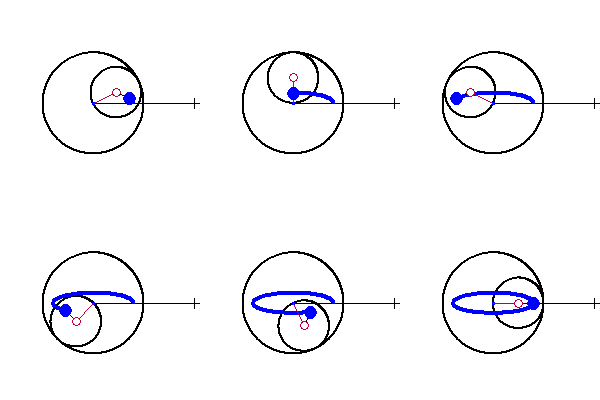
We shall now consider the curves that result when the moving circle rolls around the inside of the fixed circle. These curves are called hypocycloids and hypotrochoids. To generate today’s curves make the radius, R, of the moving circle negative.

The first seems almost a special case. Let R =  – 0.5 and S = 0.5 (below left) and then let R = S = – 0.5 (below right). The results are segments, which as we shall see are actually degenerate ellipses.

R = S = - 0.5

R = S = – 0.5

R = - 0.5,  S = + 0.5

R = – 0.5, S = + 0.5

In the following I will keep S negative. This makes the starting point (t = 0) on the positive side of the x-axis. If S is positive the starting point is to the left of the origin. The resulting curves are the same shapes by oriented differently (rotated a quarter-turn).

If R = – 1/2 the curves are ellipses. If S < R < 0 then ellipse stays inside the fixed circle (below left); if  R < S < 0 the ellipse extends outside the fixed circle (below right). If S = 0 the locus is a circle.

R = - 0.5,  S = - 0.3

R = – 0.5, S = – 0.3

R = - 0.5,  S = - .75

R = – 0.5, S = – .75

Next we consider the more general case for which the moving circle’s radius is not exactly half of the fixed circle’s radius.

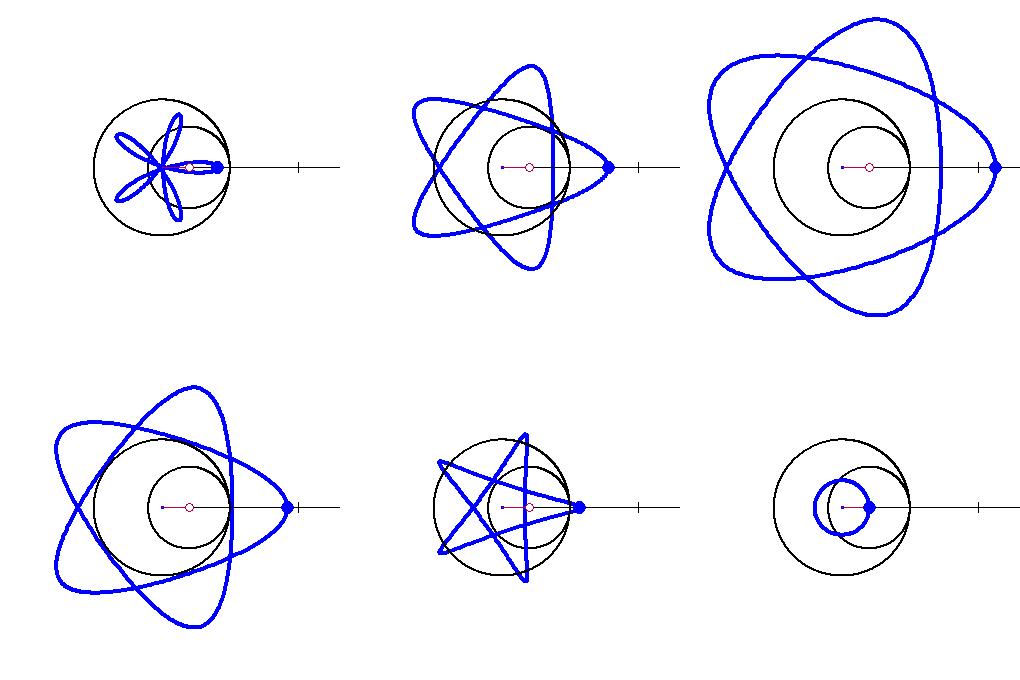
If R < S < 0, the point is in the interior of the moving circle and the graph is a series of loops (below left). When R = S , the point is on the circle, there is a star-like figure (below right). These are both called hypocycloids.

When S < R < 0 the point is outside the circle and the “stars” form rounded ends and get larger. These are the hypotrochoids (below center).

R = - 0.6,  S = - 0.3

R = – 0.6, S = – 0.3

R = S = - 0.6

R = S = – 0.6

R = - 0.6,  S = - 1

R = – 0.6, S = – 1

The next video shows the progression from S = 0 (a circle) to S = –2 and back again. (S is the distance between the center of the moving circle to the blue point.)

R = - 0.6, - 2 < S < 0,  A = 6pi

R = – 0.6, – 2 < S < 0, t = 6pi

Exploration 6: When R = –0.5 segments and ellipses are formed. Discuss how these are not really different from the cases with different negative values of R.
Exploration 7: In the case where R = S star-like figures are formed. The points of the “star” are cusps. Find the number and location of these cusps in terms of R. (Hint: see the discussion of the cusps in the second post in this series.)
Exploration 8: (Calculus) Find and discuss the derivative at the cusps when R = S.

This will be discussed in the next post. 

References:

Hyposycloid: http://en.wikipedia.org/wiki/Hypocycloid

Hypotrochoid: http://en.wikipedia.org/wiki/Hypotrochoid